Guide

Transaction coordinator software that does the work, not just the tracking

Most transaction coordinator software is a checklist with document storage: a human still reads every contract, types in the dates, and writes the emails. CloudCoord is different: it performs the coordinator's job and leaves you to review and approve it.

See how it works ↓

Tracking software vs. software that does the work

Traditional transaction management platforms (the Dotloops and SkySlopes of the world) are built to store a transaction: they hold the documents and the checklist, but the reading, the data entry, and the follow-up are still yours. CloudCoord inverts that. The software reads the executed contract, extracts the parties, price, and dates, audits it, tracks every deadline, and drafts the emails a closing needs, so your job shrinks to review and approval.

How it works

470+

Automations running your closings.

247

Complete coordinator tasks

224

Judgment calls that keep them right

Everything a transaction coordinator does. Except hitting send.

From the first contract to closing day. The file, the follow-ups, and the details. All on its plate.

01 / Contract intake

Contract intake, straight off your inbox

Forward the executed contract, or let it watch your Gmail. CloudCoord reads every page, extracts parties, price, deposit, and deadlines, and builds the live transaction file itself. No upload screens, no data entry.

  • Parties and contact details pulled from the contract.
  • Purchase price, deposit, and key dates captured together.
  • A transaction file built from the email you already received.
CloudCoord
Contract intake

48 Alder Court

From your inbox to a live file.

Details read from the executed contract
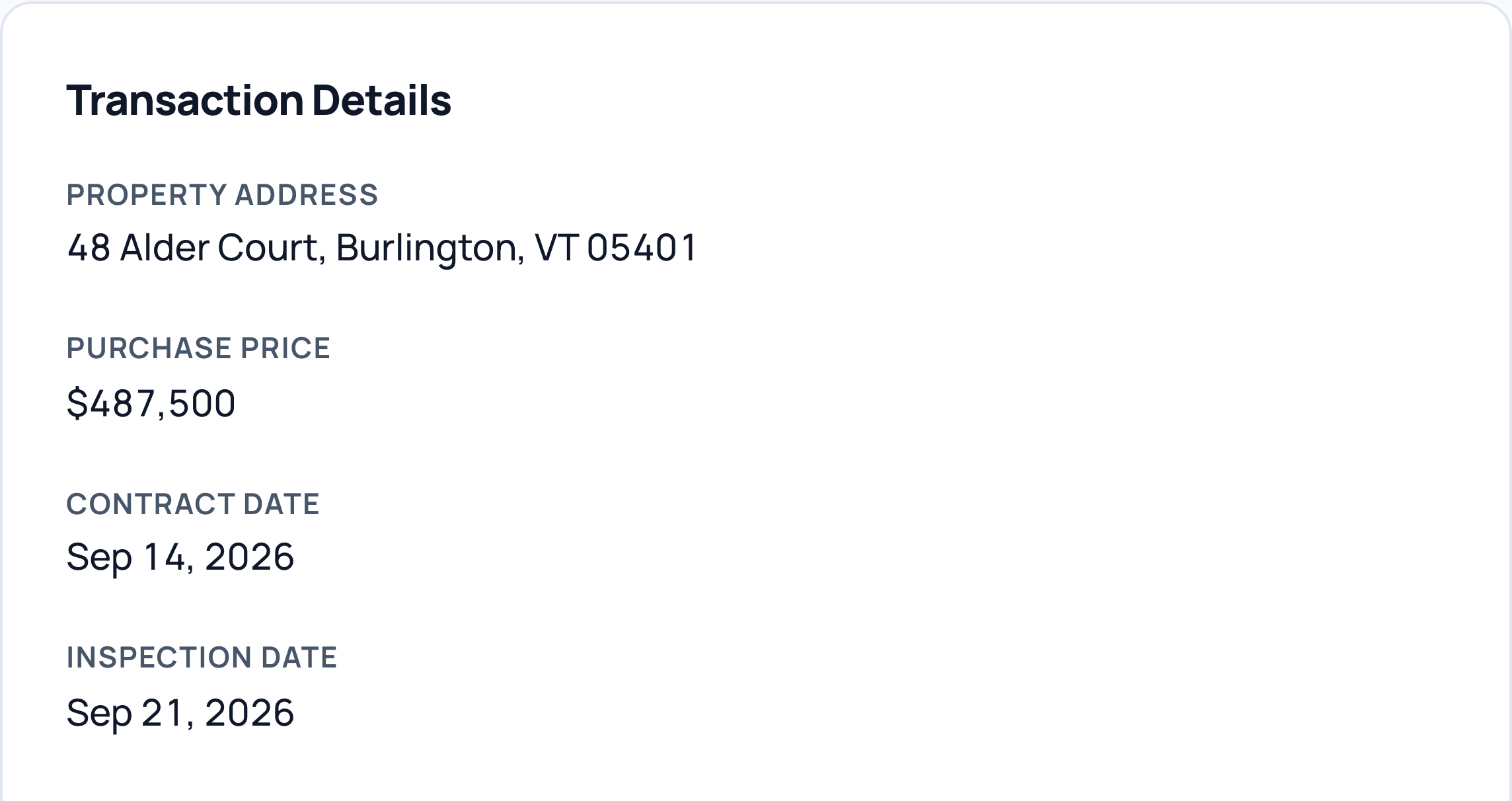
Actual CloudCoord transaction details for 48 Alder Court: purchase price $487,500, contract date September 14, and inspection date September 21, 2026.
Read this example
Property
48 Alder Court, Burlington, VT 05401
Purchase price
$487,500
Contract date
September 14, 2026
Inspection date
September 21, 2026
Real app captures in an illustrative frame · Fictional data

02 / Document audit

Document audit, 50 states

Signatures, initials, dates, and deposit terms checked against compliance rules for all 50 states. Anything missing gets flagged the minute the file arrives.

  • Missing signatures and initials flagged with page references.
  • State-specific disclosures checked alongside the contract.
  • Findings stay attached to the file for your review.
CloudCoord
Document audit

48 Alder Court · Vermont

The details worth catching.

Checked against Vermont requirements
3

Items need your attention

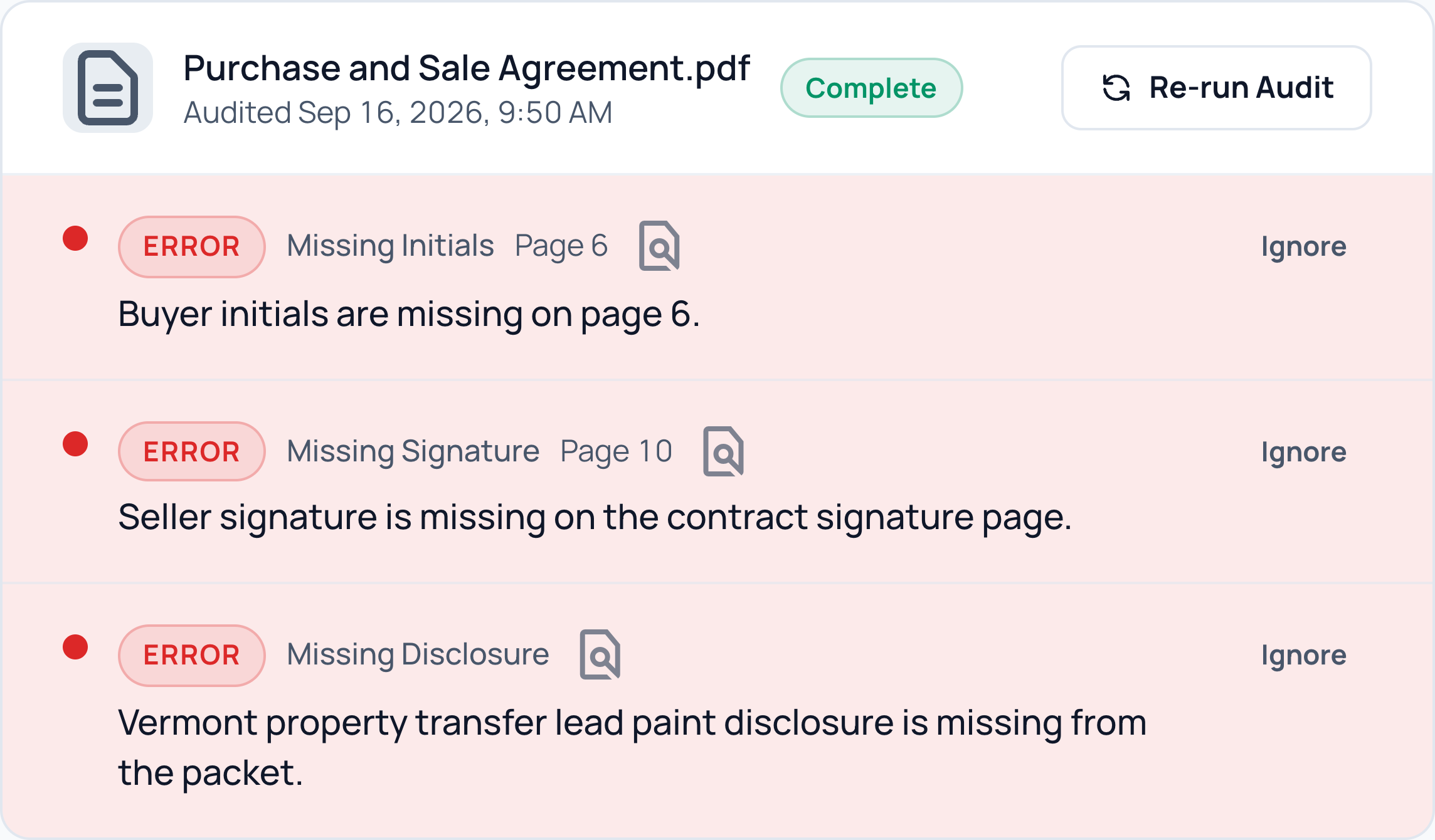
Actual CloudCoord document audit: the purchase and sale agreement is missing buyer initials on page 6, the seller’s signature on page 10, and a Vermont lead paint disclosure. Fictional demo data.
Read this example
Missing initials · Page 6
Buyer initials are missing on page 6.
Missing signature · Page 10
Seller signature is missing on the contract signature page.
Missing disclosure
Vermont property transfer lead paint disclosure is missing from the packet.
Real app captures in an illustrative frame · Fictional data

03 / Replies in Gmail

Replies drafted in your Gmail thread

It learns how you write from the emails you've already sent, then drafts replies, intros, reminders, and follow-ups that sound like you. Every draft waits in your review queue: nothing sends without your approval.

With Gmail draft sync on, reply drafts appear in the original conversation, ready for your review. No copying, pasting, or hunting for the thread.

  • Replies, introductions, reminders, and follow-ups in your voice.
  • Your imported Gmail signature is added when sent.
  • You review the wording and recipients before anything sends.
CloudCoord
Email drafts

48 Alder Court

Inspection scheduling

Original Gmail conversation
Sarah ChenTo Jordan

Friday at 9 a.m. is available for the inspection. Does that work for the buyers?

Your reply Ready for review
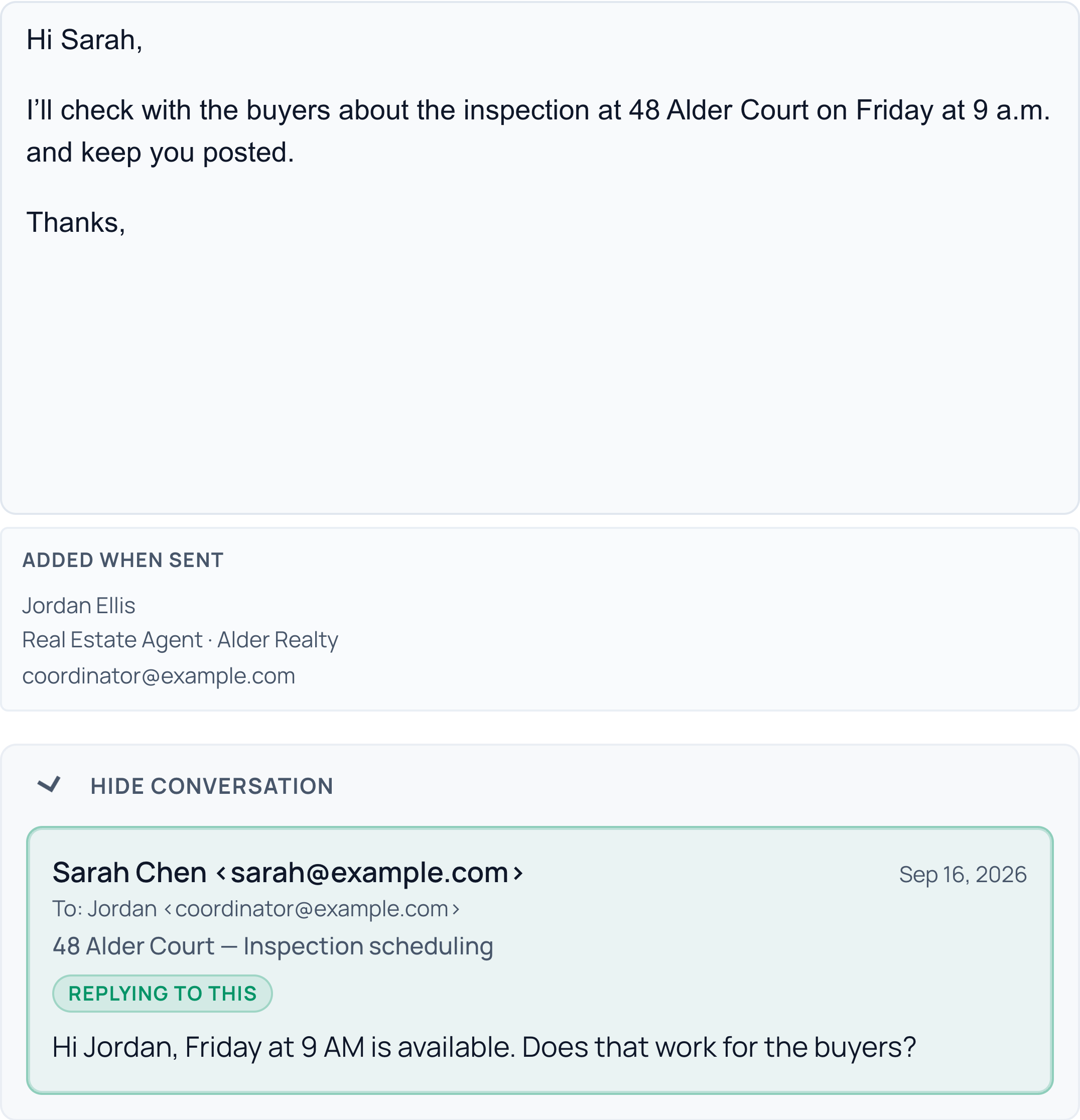
Actual CloudCoord draft: Hi Sarah, I’ll check with the buyers about the inspection at 48 Alder Court on Friday at 9 a.m. and keep you posted. Thanks,
Actual signature preview, added when sent: Jordan Ellis, Real Estate Agent · Alder Realty, coordinator@example.com.

Signature imported from Gmail

Read this example
Your reply
Hi Sarah, I’ll check with the buyers about the inspection at 48 Alder Court on Friday at 9 a.m. and keep you posted. Thanks,
Signature imported from Gmail
Jordan Ellis Real Estate Agent · Alder Realty coordinator@example.com
Real app captures in an illustrative frame · Fictional data

04 / Every deadline

Every deadline watched

Inspection, financing, walkthrough, closing: each contingency gets a watch, and the follow-up email is drafted before the date sneaks up on anyone.

  • Inspection and financing contingencies tracked together.
  • Walkthrough and closing reminders prepared ahead of time.
  • Follow-up drafts waiting in your review queue.
CloudCoord
Deadlines

48 Alder Court

The next dates, already on watch.

Deposit, inspection, and appraisal
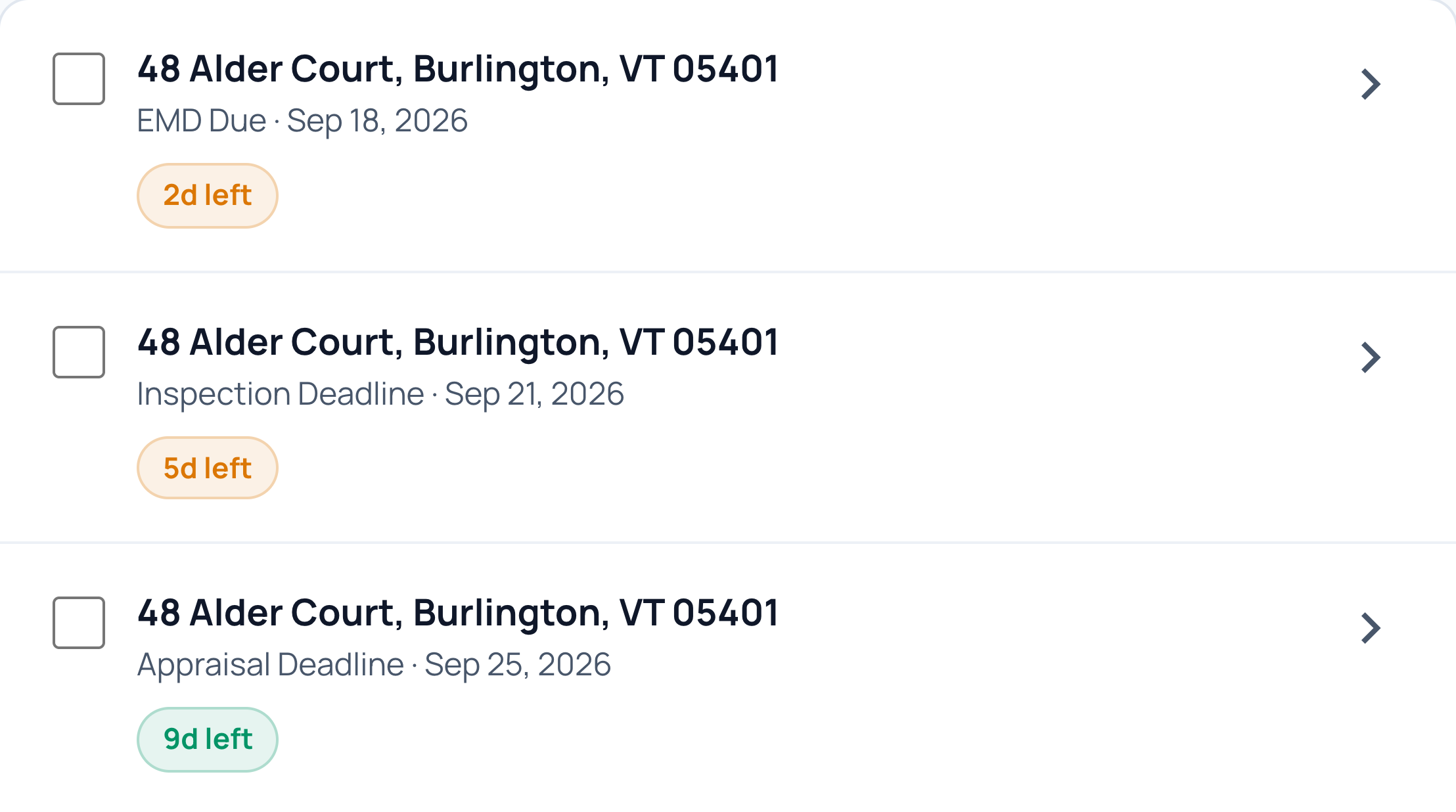
Actual CloudCoord deadlines for 48 Alder Court: earnest money due in 2 days, inspection in 5 days, and appraisal in 9 days.
Read this example
Earnest money deposit
September 18 · In 2 days
Inspection
September 21 · In 5 days
Appraisal
September 25 · In 9 days
Real app captures in an illustrative frame · Fictional data

05 / Live updates

Addendums, carried into the file

An addendum moves closing? CloudCoord updates the closing date and the pre-closing emails scheduled from it, and logs the change. Separately set deadlines stay separate.

  • The addendum matched to the right transaction.
  • Future closing-based outreach uses the new date. Review drafts already prepared.
  • A recorded change you can trace back to the file.
CloudCoord
Live file updates

48 Alder Court

One change. Everything updated.

The addendum and its follow-through
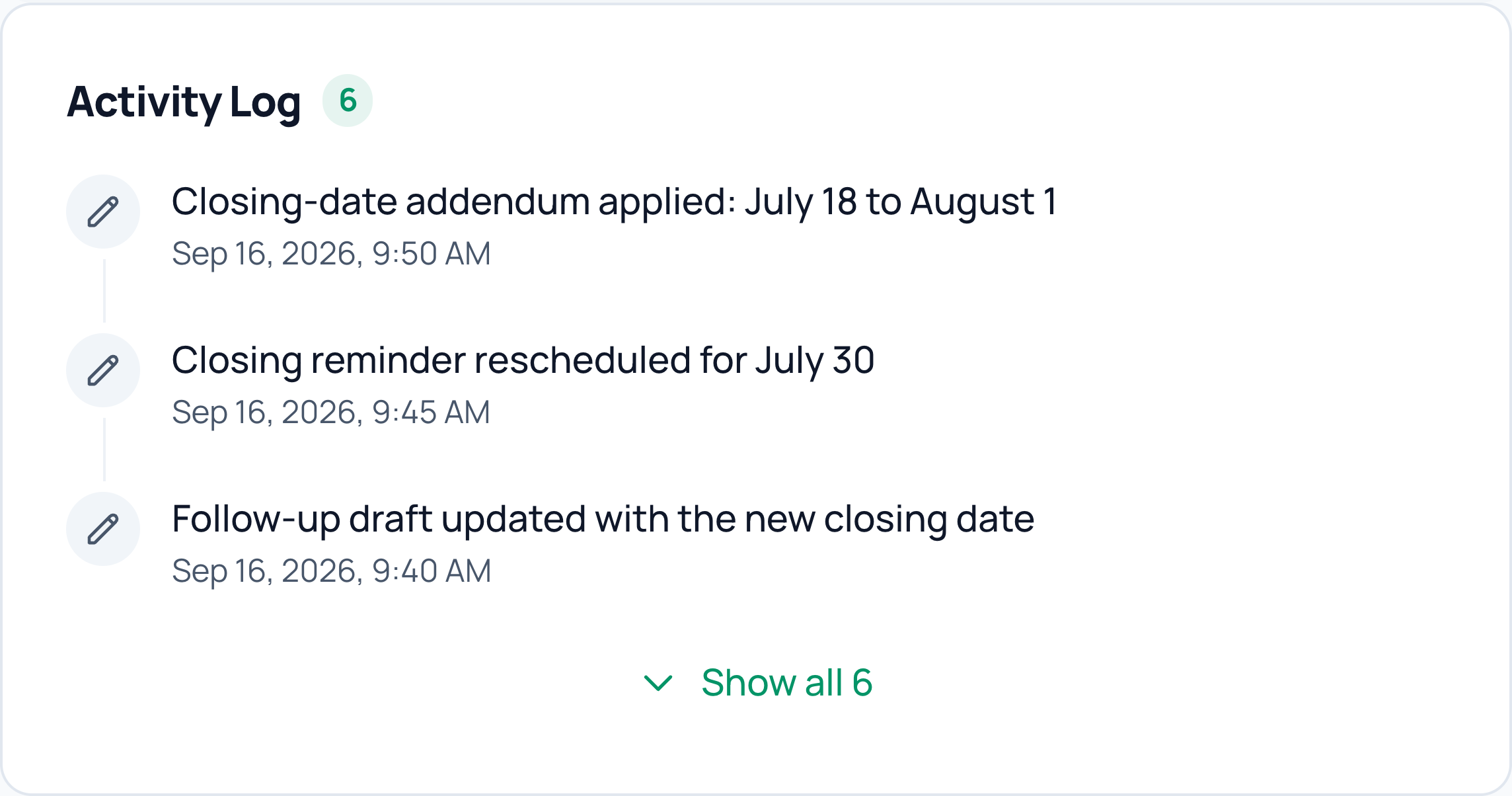
Actual CloudCoord activity log: closing-date addendum applied, closing reminder rescheduled, and the follow-up draft updated with the new date.
Read this example
Addendum applied
The closing date changed from July 18 to August 1.
Reminder rescheduled
The closing reminder moved to July 30.
Draft updated
The follow-up draft now includes the new closing date.
Real app captures in an illustrative frame · Fictional data

06 / Judgment calls

Asks instead of guessing

When the file is genuinely ambiguous, you get one precise question with the context attached. Your answer is remembered and carried into every draft.

  • The unresolved detail and its context in one place.
  • A precise answer from you, instead of an assumption.
  • Your decision carried into the follow-up draft.
CloudCoord
Judgment calls

48 Alder Court

One clear question. Your call.

The missing detail, with context
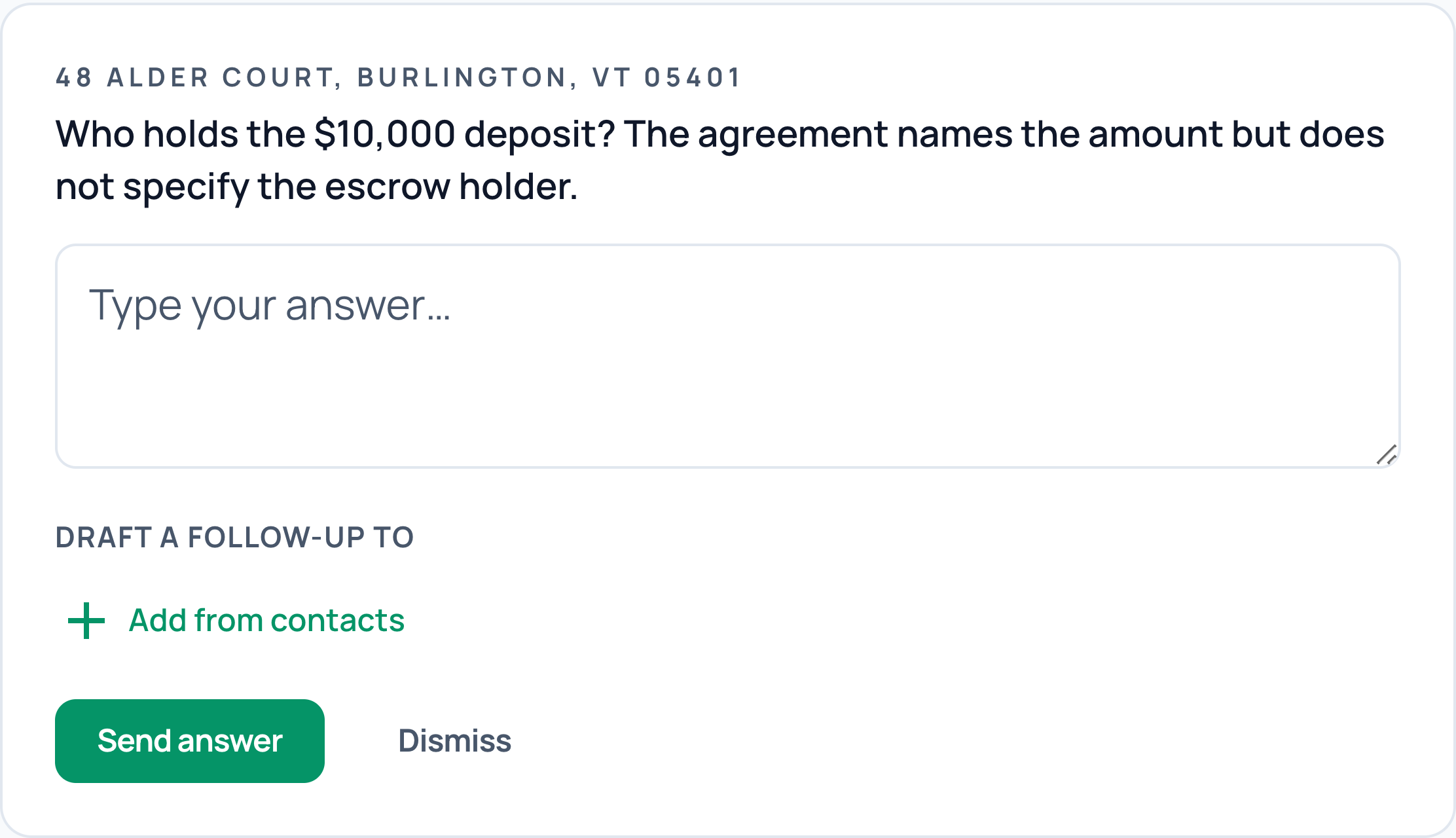
Actual CloudCoord question: who holds the $10,000 deposit? The agreement names the amount but does not specify the escrow holder. An answer field and follow-up recipient selection appear below.
Read this example
Who holds the $10,000 deposit?
The agreement names the amount but does not specify the escrow holder.
Your next step
Answer the question and choose a contact for the follow-up draft.
Real app captures in an illustrative frame · Fictional data

07 / Commission math

Commission math, done

Your side of the commission is parsed straight from the agreement, deposits are applied correctly, and the disbursement statement is drafted before closing.

  • Your commission amount and rate taken from the agreement.
  • Deposit details kept alongside the transaction.
  • A disbursement statement prepared for your review.
CloudCoord
Commission math

48 Alder Court

Your commission, accounted for.

Agreement terms · Buyer side
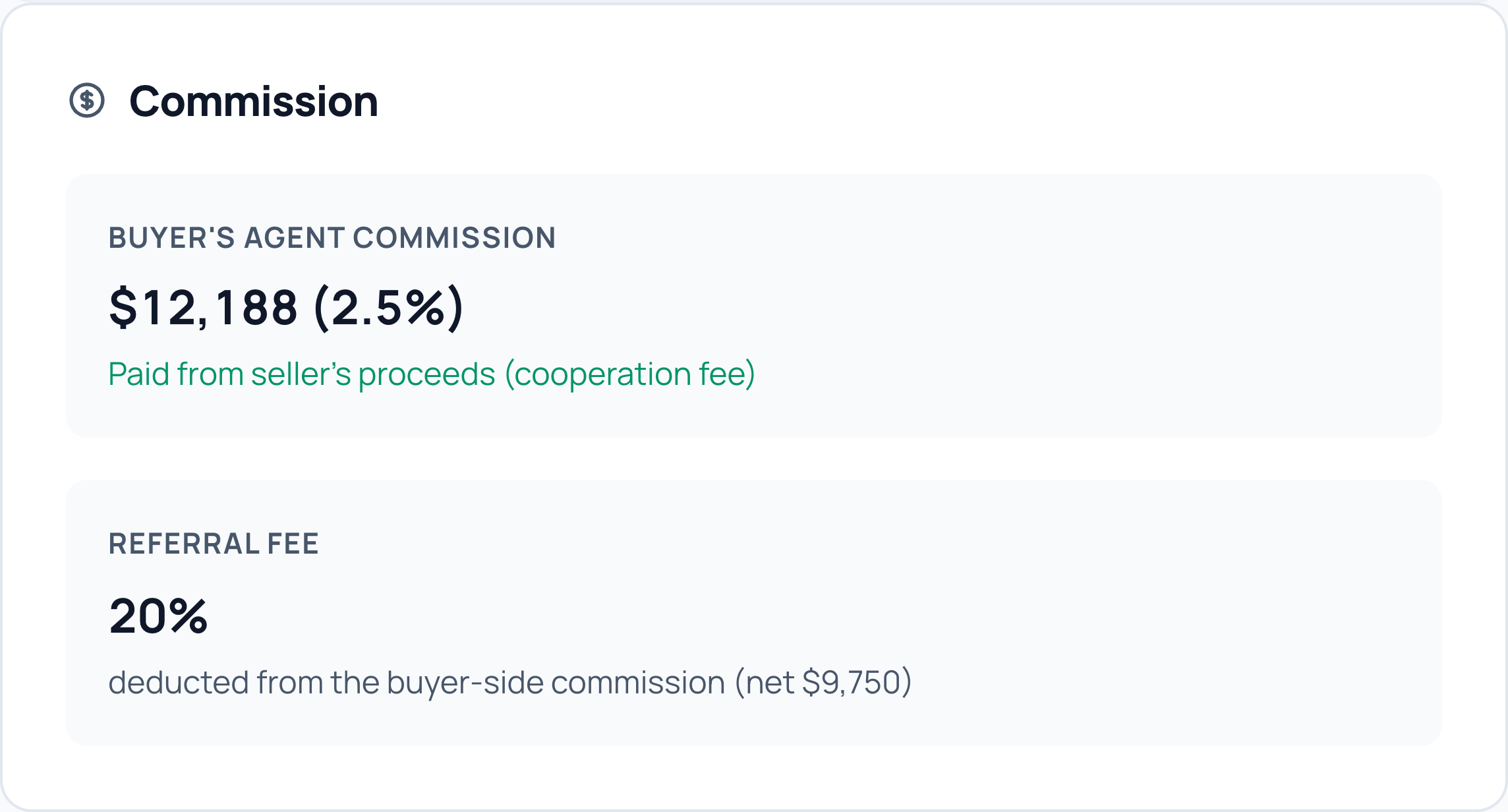
Actual CloudCoord commission breakdown: buyer’s agent commission $12,188 at 2.5%, with a 20% referral fee and net commission of $9,750.
Read this example
Buyer’s agent commission
$12,188 (2.5%), paid from the seller’s proceeds.
Referral fee
20%
Net commission
$9,750
Real app captures in an illustrative frame · Fictional data

08 / Utility reminders

Utilities lined up before closing

Before closing, CloudCoord drafts a utility reminder for your clients, with the electricity and heating-fuel providers already on file. Buyers get a reminder to start service; sellers get a reminder to arrange transfer and final billing.

Missing a provider? It flags the gap instead of guessing. You review the email before it sends.

  • Electricity and heating-fuel providers named when on file.
  • Buyers reminded to start service on closing day.
  • Sellers reminded about transfer and final billing.
CloudCoord
Utility reminders

48 Alder Court

Ready before moving day.

Utility reminder · Buyer draft
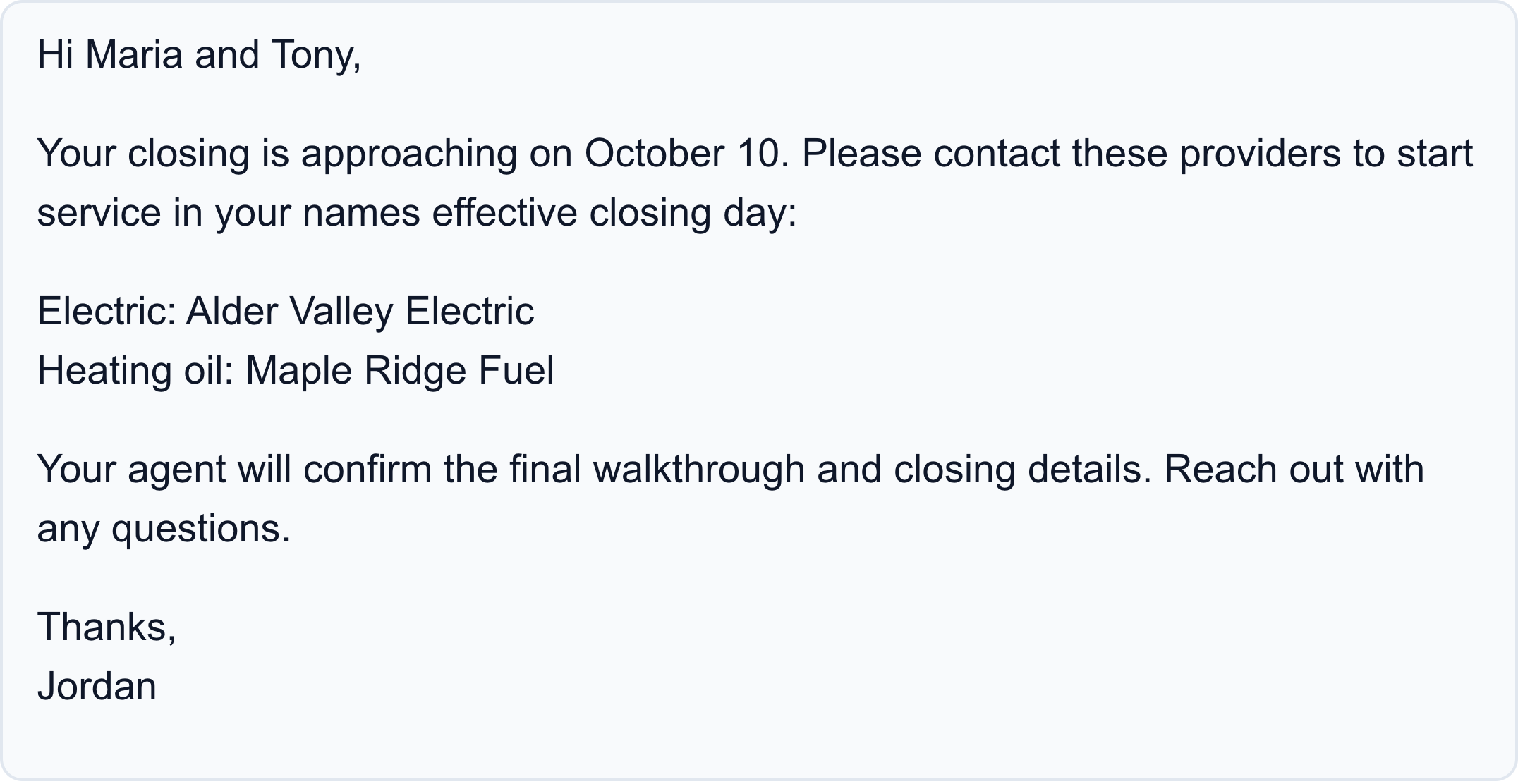
Actual CloudCoord draft to Maria and Tony: arrange electricity with Alder Valley Electric and heating oil with Maple Ridge Fuel for the October 10 closing. Your agent will confirm the walkthrough and closing details. Thanks, Jordan.
Read this example
Utility reminder for Maria and Tony
Arrange electricity with Alder Valley Electric and heating oil with Maple Ridge Fuel for the October 10 closing.
Before closing
Your agent will confirm the walkthrough and closing details.
Real app captures in an illustrative frame · Fictional data

09 / Daily briefs

Briefs you three times a day

Morning, noon, and 4 PM: what it did, what it's watching, and the few things waiting on you. You're informed without checking ten tabs.

  • What needs your decision today.
  • Deadlines coming up across your transactions.
  • A recap of the work completed and changes to the file.
CloudCoord
Daily briefs

Your daily brief

You’re already caught up.

Morning · Noon · 4 PM
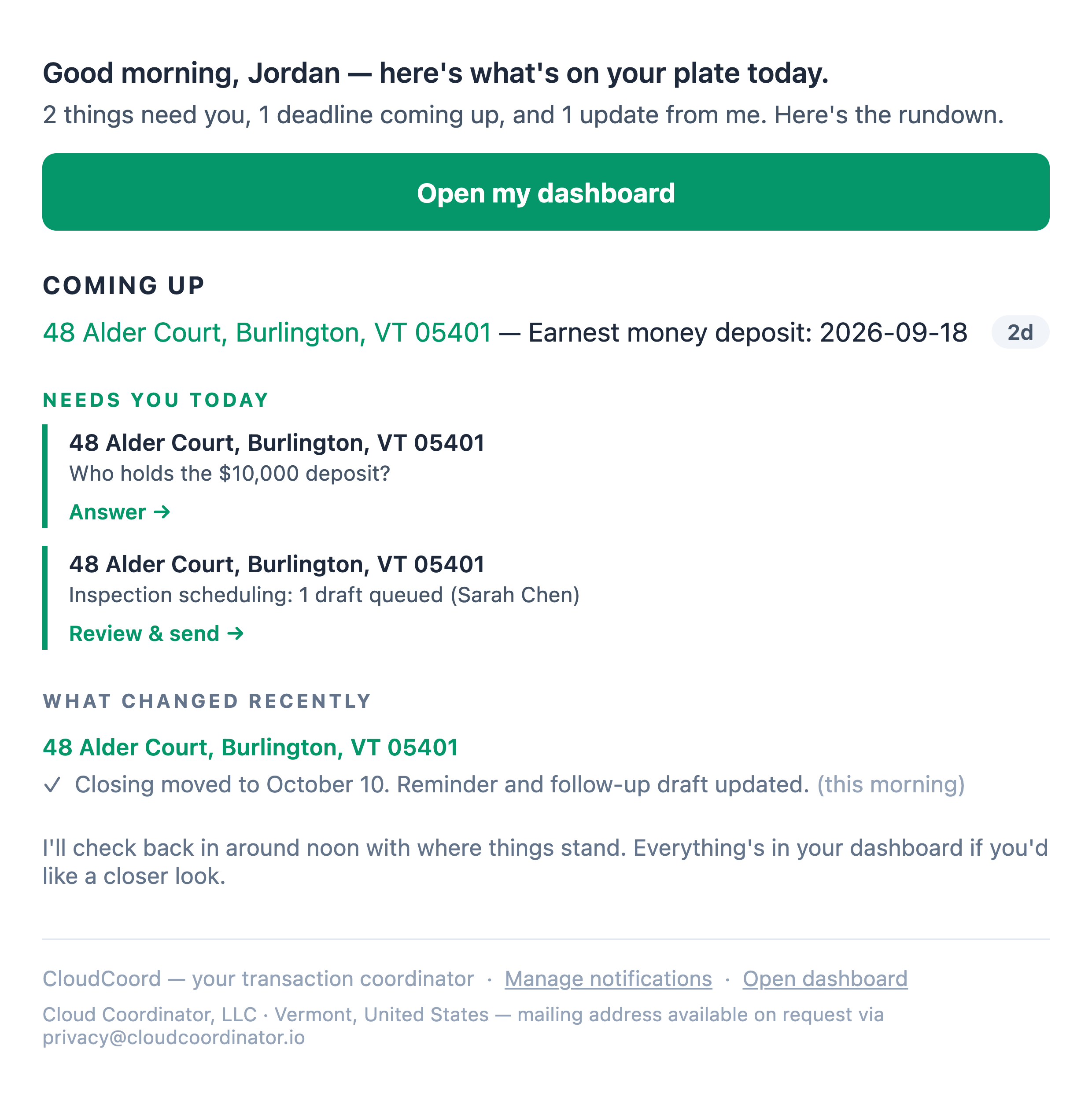
Actual CloudCoord morning brief: a deposit deadline in 2 days, a question about who holds the deposit, an inspection draft ready for review, and an update confirming the closing date, reminder, and follow-up draft changed.
Read this example
Coming up
The earnest money deposit is due in 2 days.
Needs you
Confirm who holds the deposit and review the inspection draft to Sarah.
What changed
The closing date, reminder, and follow-up draft have been updated.
Real app captures in an illustrative frame · Fictional data
CloudCoord
Contract intake

48 Alder Court

From your inbox to a live file.

Details read from the executed contract
Actual CloudCoord transaction details for 48 Alder Court: purchase price $487,500, contract date September 14, and inspection date September 21, 2026.
Read this example
Property
48 Alder Court, Burlington, VT 05401
Purchase price
$487,500
Contract date
September 14, 2026
Inspection date
September 21, 2026
Real app captures in an illustrative frame · Fictional data

What it handles on every file

Document management for transaction coordinators

Transaction coordinator document management software should help you understand what each document changes. CloudCoord reads executed contracts and incoming addenda, organizes them with the transaction, and uses their terms to track deadlines and prepare follow-up drafts. You review the work before any message sends. Keep your broker's required forms, e-signature tools, and compliance archive in mind when deciding how it fits your workflow.

Flat pricing instead of per-seat or per-file

Most transaction coordinator software charges per user seat, and independent human coordinators charge $300–$500 per file. Both scale up exactly as your business grows. CloudCoord is a flat monthly rate: $149/month for a solo agent, $499/month for a team of up to ten. The price is predictable whether you close three files a month or thirty. See full pricing.

$149

per month, solo

One flat rate for an individual agent, at any file volume.

$499

per month, team

Covers a team of up to 10 agents. Extra agents are $40 a month each, never blocked.

$300–500

per file, a human TC

What independent coordinators charge. Twenty closings a year runs $6,000–$10,000, and it scales with your volume.

How to choose transaction coordinator software

The market splits into three groups: document-storage platforms (Dotloop, SkySlope), TC-specific workflow tools (Open to Close, tcDocs, Paperless Pipeline), and the newer AI coordinators that read and draft on their own. Which fits depends on whether you want software that holds the file or software that works it. We break down the full landscape in the best transaction coordinator software comparison.

Free trial

Let CloudCoord coordinate your next closing

Start your two-week free trial. We'll learn your state and firm requirements and configure document follow-ups and sharing around your process. Guided setup is included.

Two-week free trial · Solo $149/mo · Teams $499/mo · Onboarding included