The AI Transaction Coordinator that Acts Before You Ask.
Built for real estate agents and teams. CloudCoord automatically reads incoming contracts, tracks deadlines, and drafts follow-ups in your voice without waiting for a prompt. You approve every send.
No data entry: it reads the paperworkNo data entry: it reads the paperworkNo data entryAuto intake
Compliance rules for all 50 statesCompliance rules for all 50 statesAll 50 states50 states
Nothing sends without your approvalNothing sends without your approvalYou approve every sendYou approve
Works inside the inbox you already useWorks inside the inbox you already useIn your inboxYour inbox
How it works
470+
Automations running your closings.
247
Complete coordinator tasks
224
Judgment calls that keep them right
Everything a transaction coordinator does. Except hitting send.
From the first contract to closing day. The file, the follow-ups, and the details. All on its plate.
01 / Contract intake
Contract intake, straight off your inbox
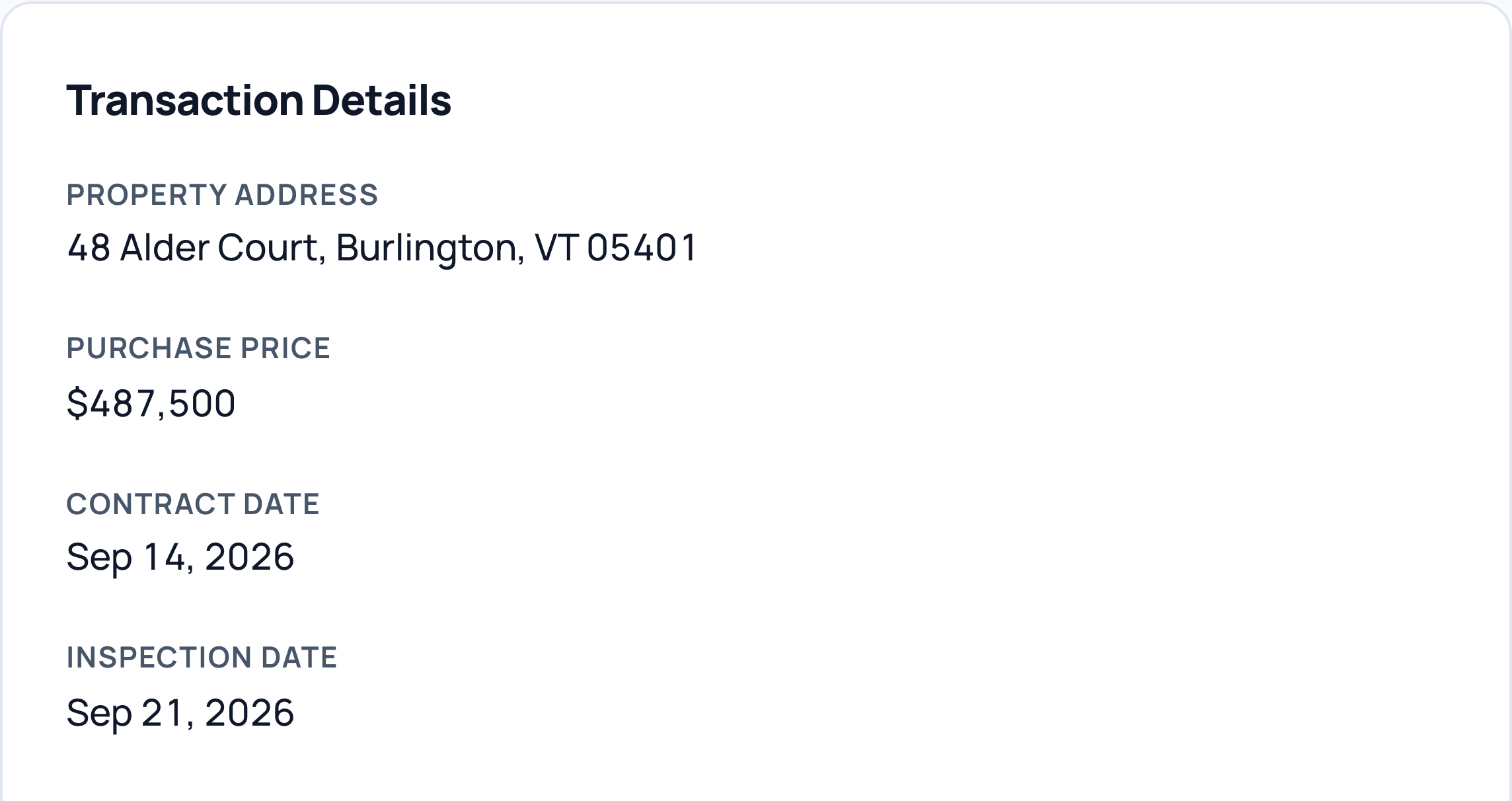
Forward the executed contract, or let it watch your Gmail. CloudCoord reads every page, extracts parties, price, deposit, and deadlines, and builds the live transaction file itself. No upload screens, no data entry.
Parties and contact details pulled from the contract.
Purchase price, deposit, and key dates captured together.
A transaction file built from the email you already received.
CloudCoord
Contract intake
48 Alder Court
From your inbox to a live file.
Details read from the executed contract
Read this example
Property
48 Alder Court, Burlington, VT 05401
Purchase price
$487,500
Contract date
September 14, 2026
Inspection date
September 21, 2026
Real app captures in an illustrative frame · Fictional data
02 / Document audit
Document audit, 50 states
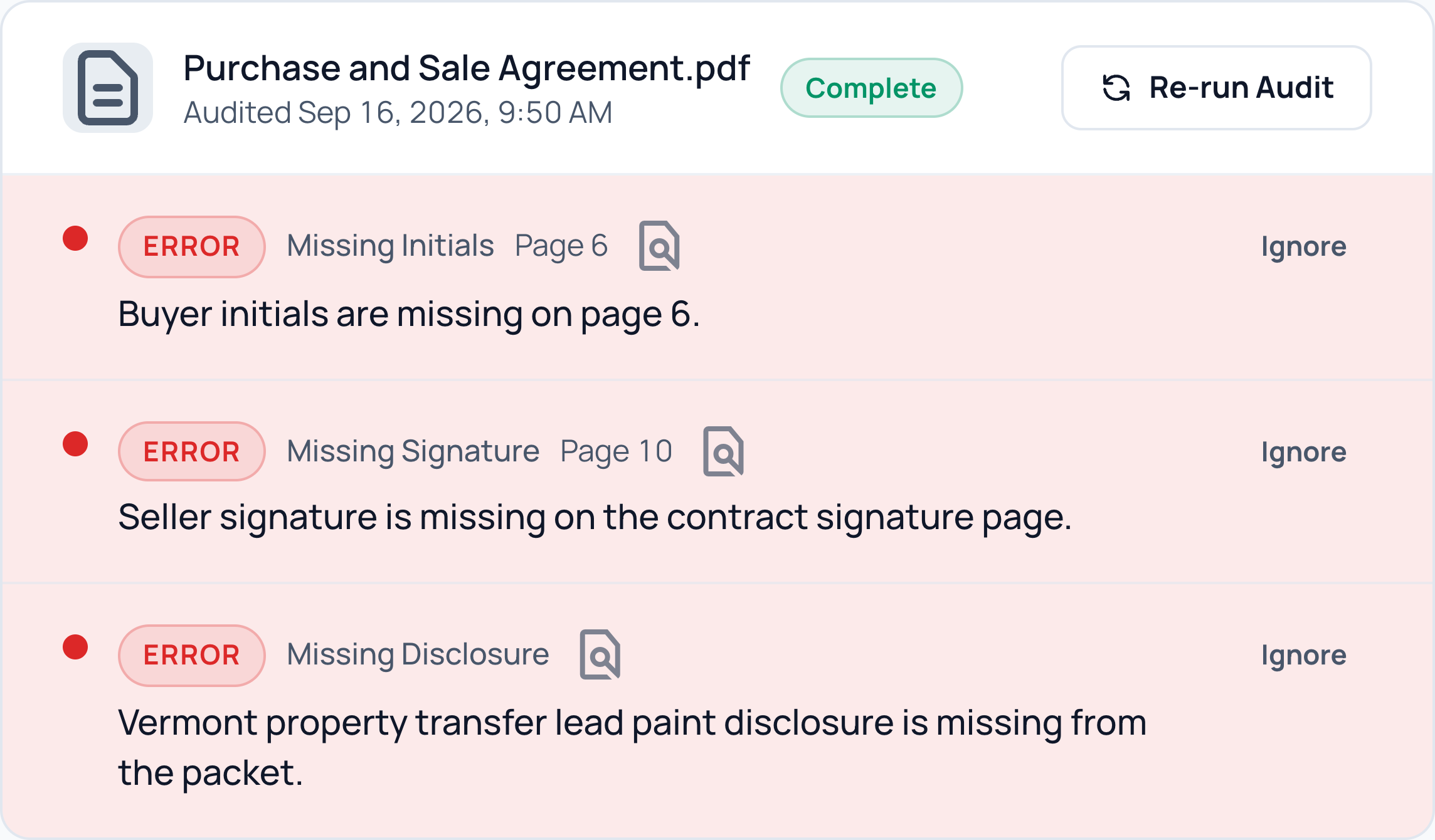
Signatures, initials, dates, and deposit terms checked against compliance rules for all 50 states. Anything missing gets flagged the minute the file arrives.
Missing signatures and initials flagged with page references.
State-specific disclosures checked alongside the contract.
Findings stay attached to the file for your review.
CloudCoord
Document audit
48 Alder Court · Vermont
The details worth catching.
Checked against Vermont requirements
3
Items need your attention
Read this example
Missing initials · Page 6
Buyer initials are missing on page 6.
Missing signature · Page 10
Seller signature is missing on the contract signature page.
Missing disclosure
Vermont property transfer lead paint disclosure is missing from the packet.
Real app captures in an illustrative frame · Fictional data
03 / Replies in Gmail
Replies drafted in your Gmail thread
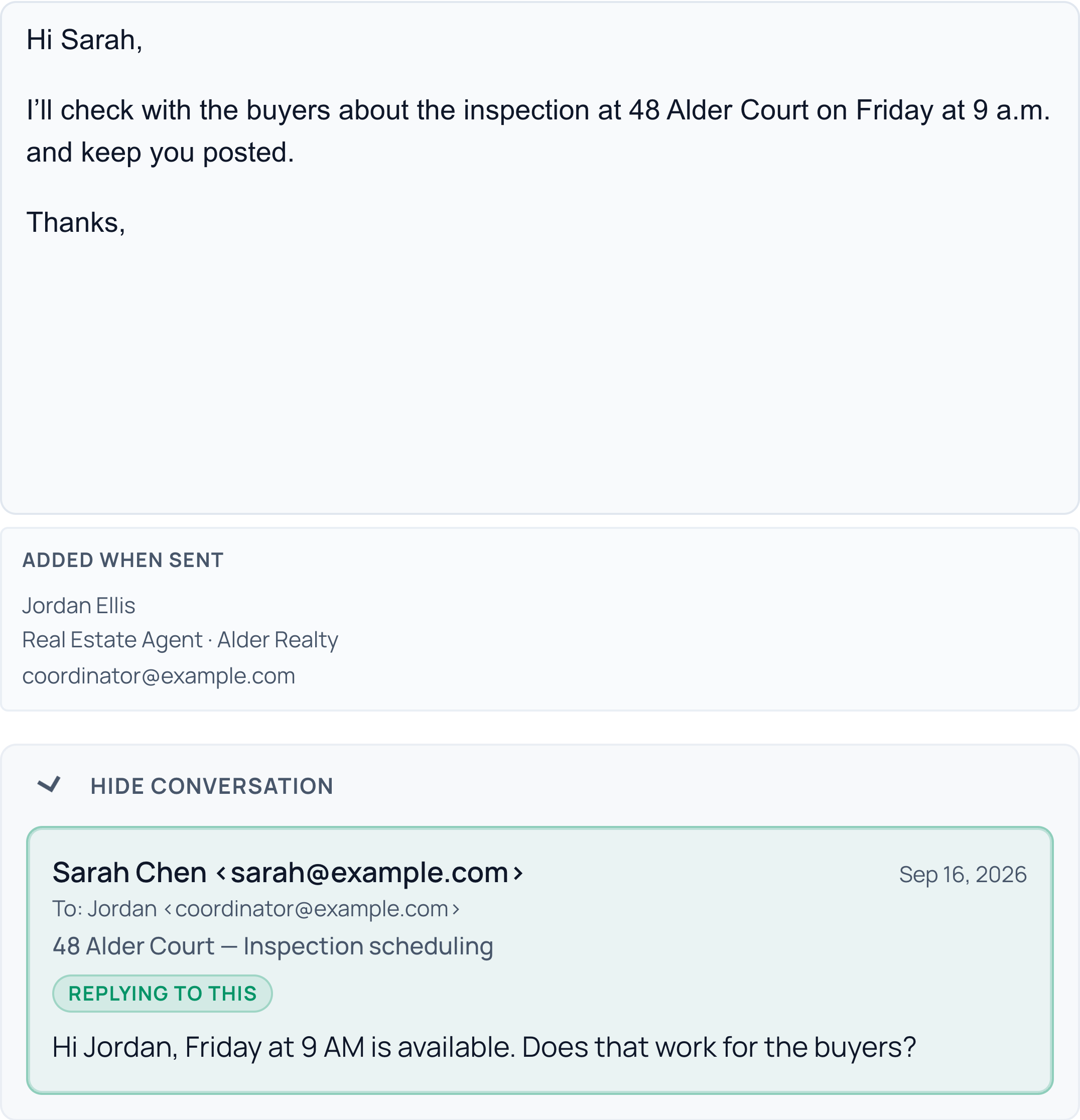
It learns how you write from the emails you've already sent, then drafts replies, intros, reminders, and follow-ups that sound like you. Every draft waits in your review queue: nothing sends without your approval.
With Gmail draft sync on, reply drafts appear in the original conversation, ready for your review. No copying, pasting, or hunting for the thread.
Replies, introductions, reminders, and follow-ups in your voice.
Your imported Gmail signature is added when sent.
You review the wording and recipients before anything sends.
CloudCoord
Email drafts
48 Alder Court
Inspection scheduling
Original Gmail conversation
SC
Sarah ChenTo Jordan
Friday at 9 a.m. is available for the inspection. Does that work for the buyers?
Your reply Ready for review
Signature imported from Gmail
Read this example
Your reply
Hi Sarah,
I’ll check with the buyers about the inspection at 48 Alder Court on Friday at 9 a.m. and keep you posted.
Thanks,
Signature imported from Gmail
Jordan Ellis
Real Estate Agent · Alder Realty
coordinator@example.com
Real app captures in an illustrative frame · Fictional data
04 / Every deadline
Every deadline watched
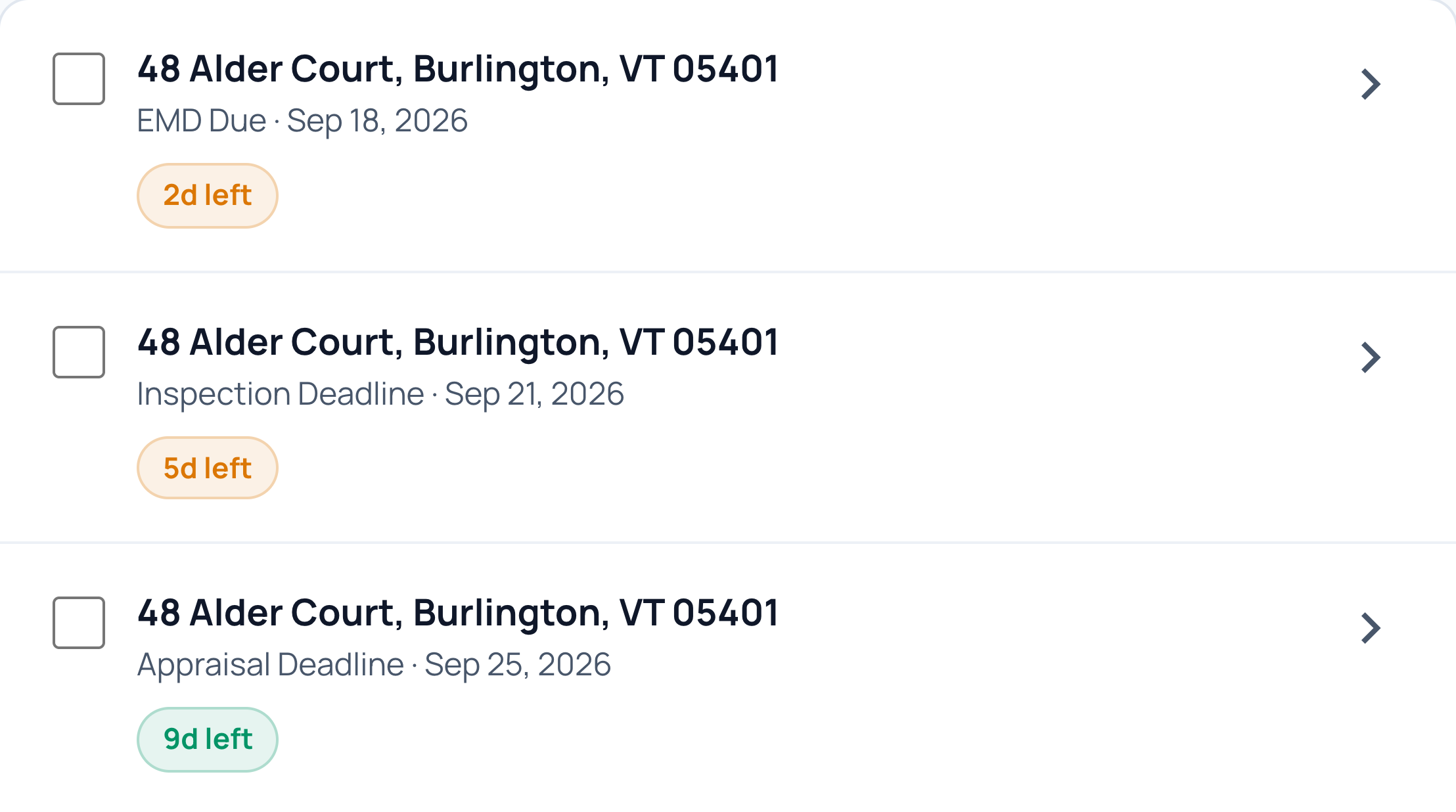
Inspection, financing, walkthrough, closing: each contingency gets a watch, and the follow-up email is drafted before the date sneaks up on anyone.
Inspection and financing contingencies tracked together.
Walkthrough and closing reminders prepared ahead of time.
Follow-up drafts waiting in your review queue.
CloudCoord
Deadlines
48 Alder Court
The next dates, already on watch.
Deposit, inspection, and appraisal
Read this example
Earnest money deposit
September 18 · In 2 days
Inspection
September 21 · In 5 days
Appraisal
September 25 · In 9 days
Real app captures in an illustrative frame · Fictional data
05 / Live updates
Addendums, carried into the file
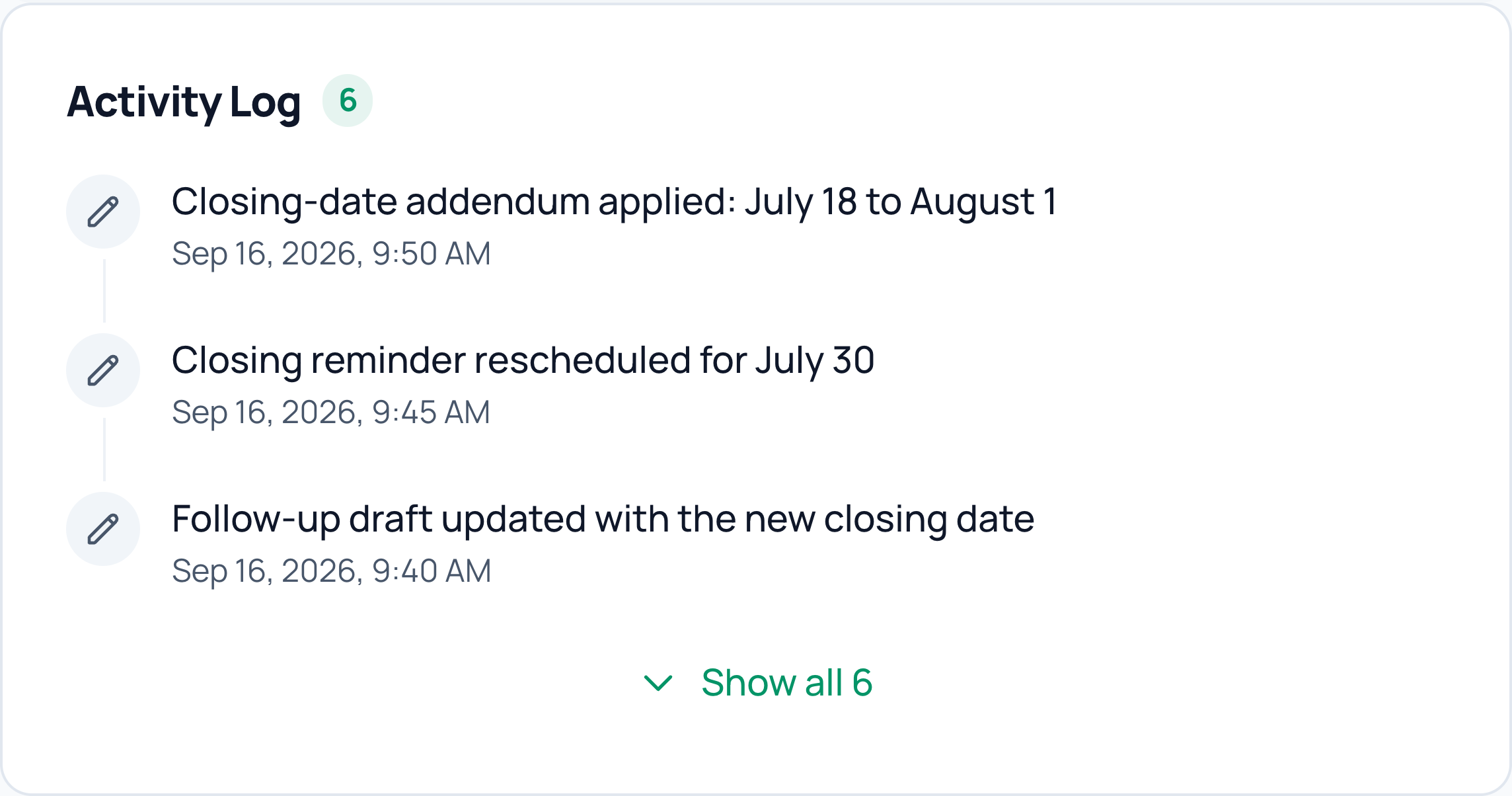
An addendum moves closing? CloudCoord updates the closing date and the pre-closing emails scheduled from it, and logs the change. Separately set deadlines stay separate.
The addendum matched to the right transaction.
Future closing-based outreach uses the new date. Review drafts already prepared.
A recorded change you can trace back to the file.
CloudCoord
Live file updates
48 Alder Court
One change. Everything updated.
The addendum and its follow-through
Read this example
Addendum applied
The closing date changed from July 18 to August 1.
Reminder rescheduled
The closing reminder moved to July 30.
Draft updated
The follow-up draft now includes the new closing date.
Real app captures in an illustrative frame · Fictional data
06 / Judgment calls
Asks instead of guessing
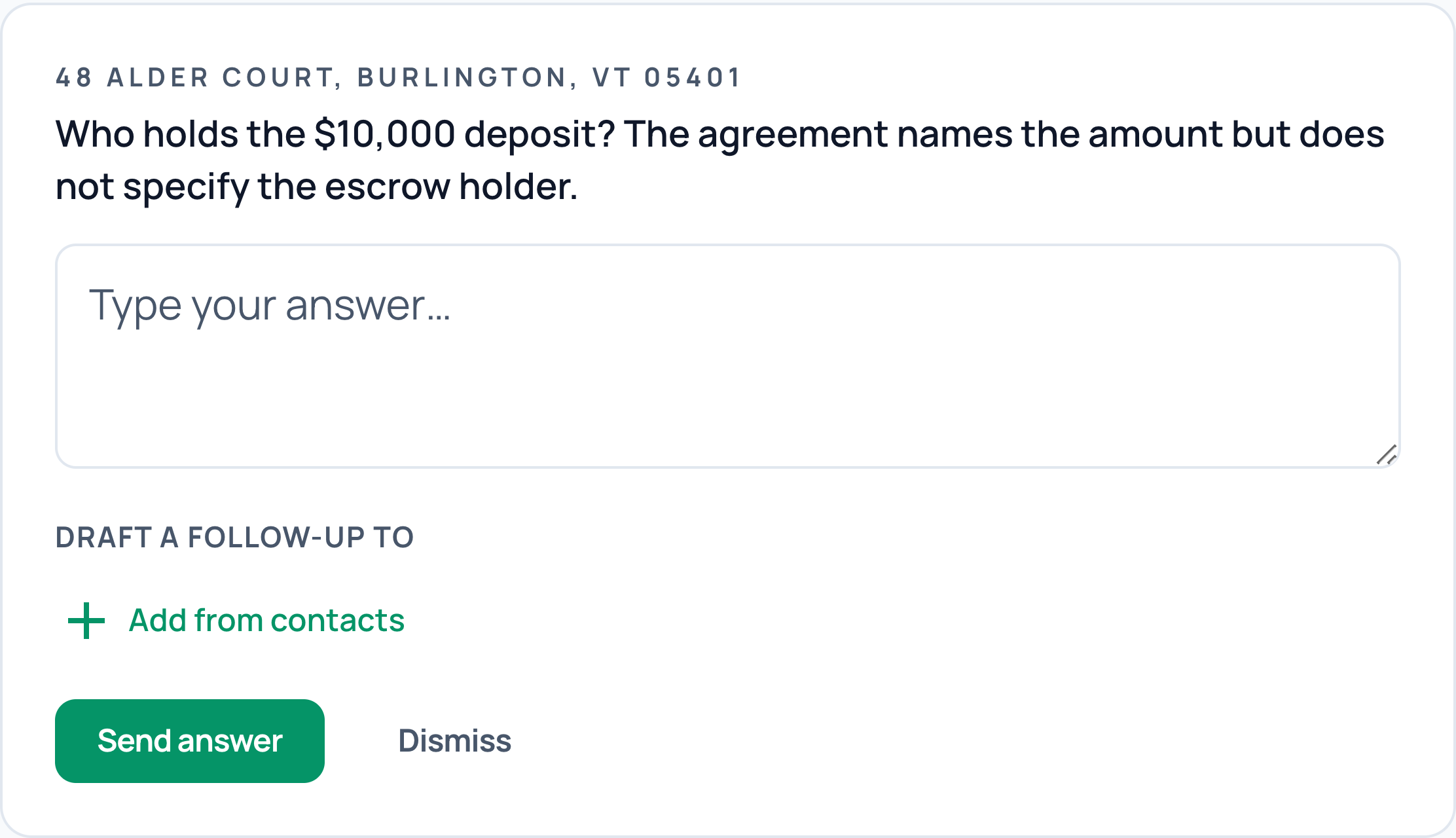
When the file is genuinely ambiguous, you get one precise question with the context attached. Your answer is remembered and carried into every draft.
The unresolved detail and its context in one place.
A precise answer from you, instead of an assumption.
Your decision carried into the follow-up draft.
CloudCoord
Judgment calls
48 Alder Court
One clear question. Your call.
The missing detail, with context
Read this example
Who holds the $10,000 deposit?
The agreement names the amount but does not specify the escrow holder.
Your next step
Answer the question and choose a contact for the follow-up draft.
Real app captures in an illustrative frame · Fictional data
07 / Commission math
Commission math, done
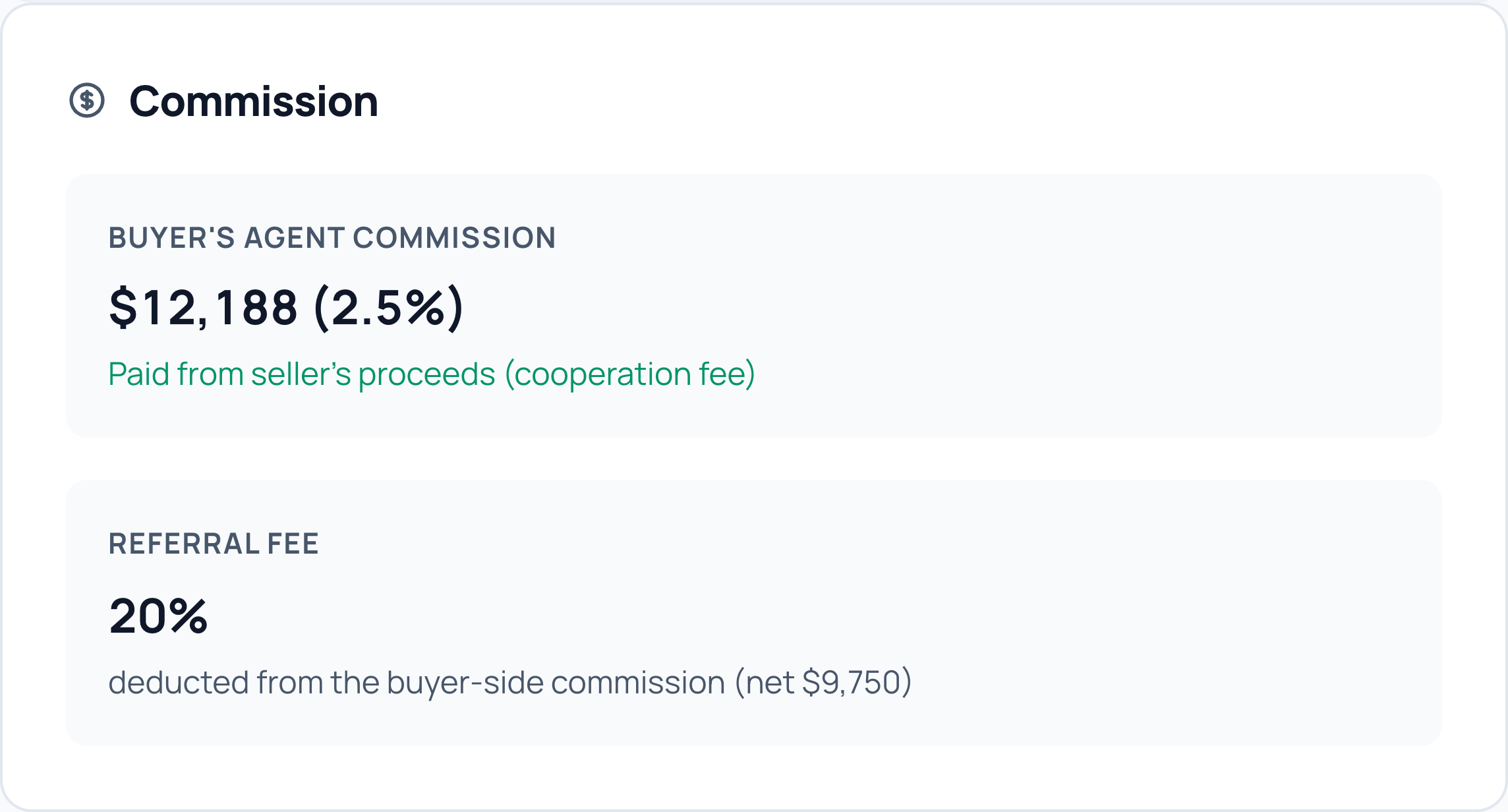
Your side of the commission is parsed straight from the agreement, deposits are applied correctly, and the disbursement statement is drafted before closing.
Your commission amount and rate taken from the agreement.
Deposit details kept alongside the transaction.
A disbursement statement prepared for your review.
CloudCoord
Commission math
48 Alder Court
Your commission, accounted for.
Agreement terms · Buyer side
Read this example
Buyer’s agent commission
$12,188 (2.5%), paid from the seller’s proceeds.
Referral fee
20%
Net commission
$9,750
Real app captures in an illustrative frame · Fictional data
08 / Utility reminders
Utilities lined up before closing
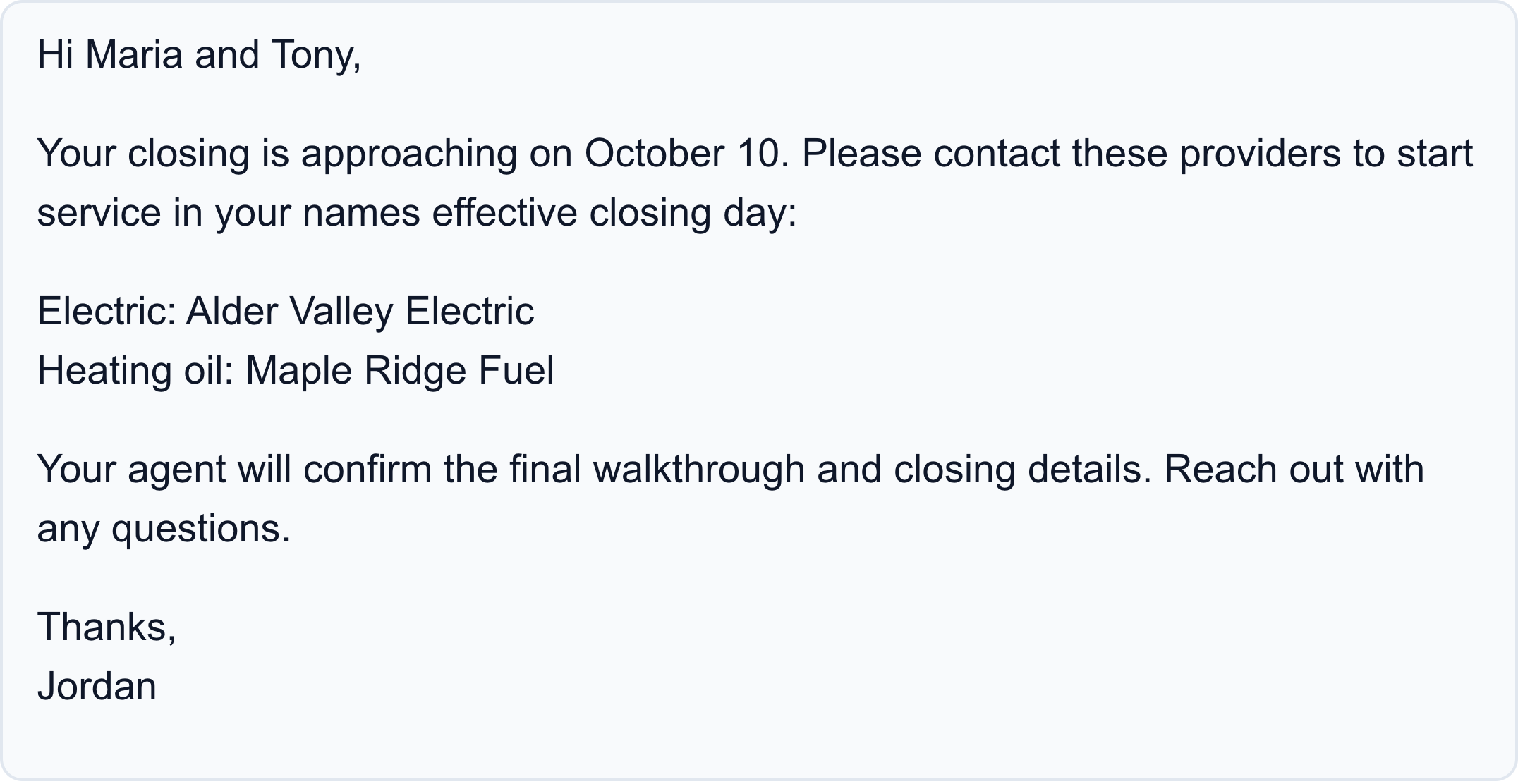
Before closing, CloudCoord drafts a utility reminder for your clients, with the electricity and heating-fuel providers already on file. Buyers get a reminder to start service; sellers get a reminder to arrange transfer and final billing.
Missing a provider? It flags the gap instead of guessing. You review the email before it sends.
Electricity and heating-fuel providers named when on file.
Buyers reminded to start service on closing day.
Sellers reminded about transfer and final billing.
CloudCoord
Utility reminders
48 Alder Court
Ready before moving day.
Utility reminder · Buyer draft
Read this example
Utility reminder for Maria and Tony
Arrange electricity with Alder Valley Electric and heating oil with Maple Ridge Fuel for the October 10 closing.
Before closing
Your agent will confirm the walkthrough and closing details.
Real app captures in an illustrative frame · Fictional data
09 / Daily briefs
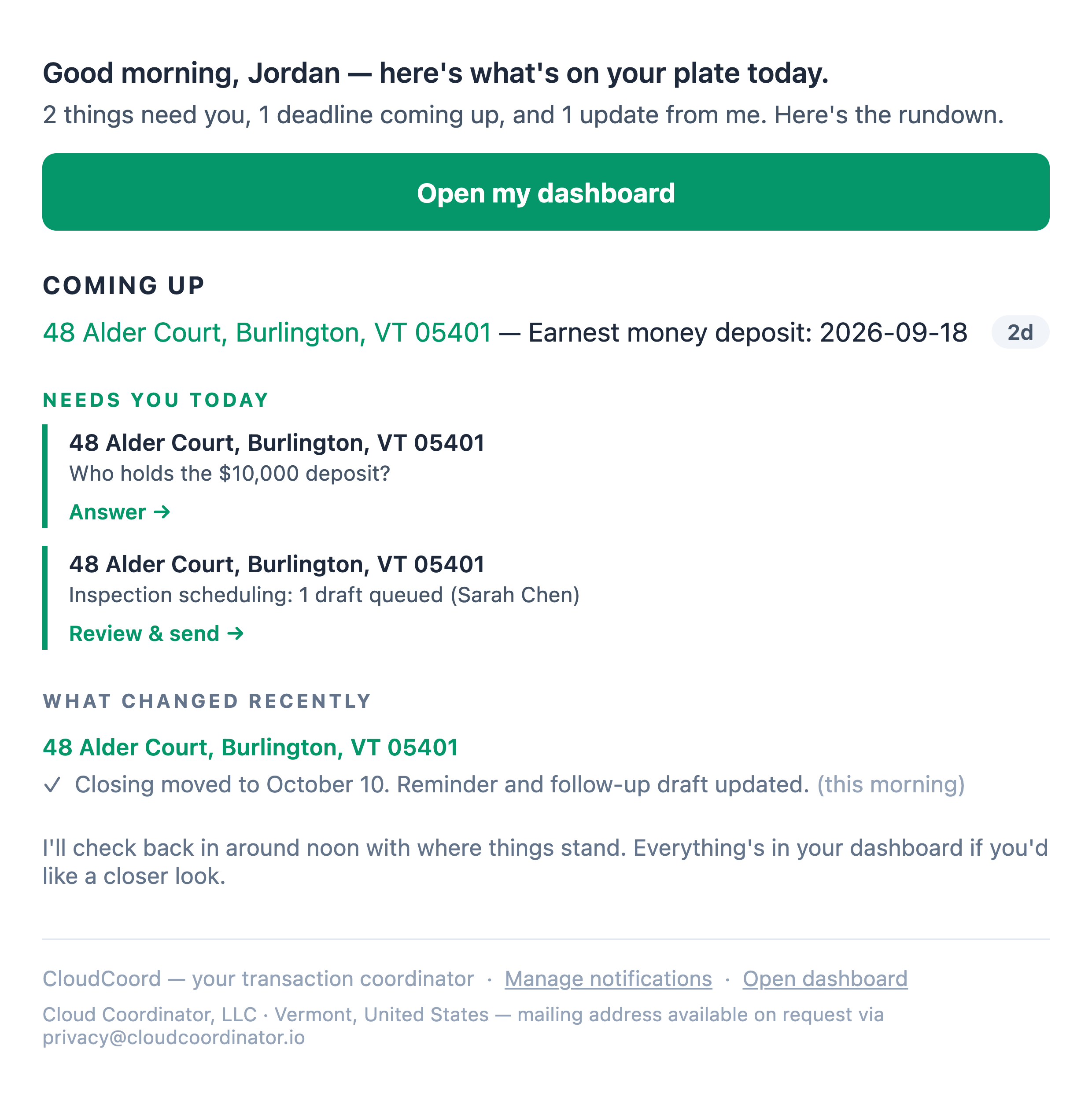
Briefs you three times a day
Morning, noon, and 4 PM: what it did, what it's watching, and the few things waiting on you. You're informed without checking ten tabs.
What needs your decision today.
Deadlines coming up across your transactions.
A recap of the work completed and changes to the file.
CloudCoord
Daily briefs
Your daily brief
You’re already caught up.
Morning · Noon · 4 PM
Read this example
Coming up
The earnest money deposit is due in 2 days.
Needs you
Confirm who holds the deposit and review the inspection draft to Sarah.
What changed
The closing date, reminder, and follow-up draft have been updated.
Real app captures in an illustrative frame · Fictional data
CloudCoord
Contract intake
48 Alder Court
From your inbox to a live file.
Details read from the executed contract
Read this example
Property
48 Alder Court, Burlington, VT 05401
Purchase price
$487,500
Contract date
September 14, 2026
Inspection date
September 21, 2026
Real app captures in an illustrative frame · Fictional data
Why it's different
Tools wait for instructions. Employees act.
Most "transaction coordinator software" is a smarter checklist: it tracks the work and waits for you to do it.
CloudCoord does the work first and brings you the decisions: the difference between software you operate and an employee you manage.
We call this closed-loop transaction coordination: the work runs from the inbound email to a finished draft waiting on your approval. Here's the whole loop.
The moment
A transaction tool
CloudCoord
A new contract arrives
You create the file and type every date in
The file builds itself off the email
A deadline is coming
A reminder pings you to go do the work
The follow-up email is already drafted
An addendum changes the dates
You re-enter every date it touches
Supported date changes update the file and related follow-up
Something in the file is ambiguous
Nothing happens: you find out at closing
It asks you one precise question, once
End of the day
You check ten tabs to feel safe
It briefs you on everything it did
Solo agents
The coordinator seat, covered.
You're doing the TC's job at 9 PM, or paying $300–500 a file for someone else to. CloudCoord takes the intake, the auditing, the chasing, and the drafting, and leaves you the ten-second approvals.
Every file gets full-time attention, even when you're showing houses
Your voice on every email: clients never feel a handoff
One flat monthly price, however many deals you're juggling
Teams up to 10
One employee, the whole roster.
Your coordinator stops drowning in data entry and starts reviewing finished work. Every agent's transactions flow through one queue with team-wide visibility, routed by rules that never get skipped.
Coordinator-level review queue across all agents' files
Role-based visibility: everyone sees exactly what they should
Hard-coded routing: clients never get problem emails by mistake
Onboarding included
Your state. Your firm. Your way of working.
CloudCoord already takes documents from your email and organizes them in your files. Onboarding connects that intake to the way you run a closing: what needs to be collected, who needs a copy, and when to follow up.
01
Share how your firm works
Bring your checklists, required documents, email examples, and state-specific steps. No written process yet? We’ll walk through it together on your setup call.
02
We configure the follow-through
We review your state and firm requirements, then configure supported email automations to chase missing documents, share documents and disclosures, and keep the next step moving. Together, we work through recipients, timing, and exceptions around your current process.
03
Review together. Activate when ready.
We walk through a representative transaction and teach you how to use your setup. You review the configured workflow and approve activation. Every outgoing email still needs your approval.
Intake and document audits remain available while we work on your setup. Proactive emails and custom reminders start after you approve it, following your account settings.
For a solo agent
Three ways to get the work done at twenty closings a year.
~300 hrs
a year, doing it yourself
About fifteen hours a file of intake, auditing, and deadline-chasing, across twenty closings a year. No invoice. Evenings, mostly.
$6k–10k
per year, hiring a TC
Twenty closings at the $300–500 per file a human transaction coordinator typically charges. Scales with your volume.
$149
per month, the Solo plan
Month to month: the same price at any file volume. No per-file fees, no onboarding fee, cancel anytime.
For a team of up to 10 agents
Three ways to staff the coordinator's seat at 100 closings a year.
$50k–70k
per year, an in-house TC
Salary for a full-time transaction coordinator, before benefits and turnover.
$30k–50k
per year, a per-file TC
100 closings at $300–500 per file, a typical year for a 10-agent team.
$499
per month, the Team plan
Month to month, for up to 10 agents: the same price at any file volume. Extra agents are $40 a month each, never blocked. Cancel anytime.
Pricing
A Fraction of a Hire.
An employee's output without an employee's payroll: predictable monthly pricing, never billed per file.
Solo Agent
The coordinator seat covered, without hiring one.
$149/month
Two-week free trial to start
Your own AI transaction coordinator
Contract intake, audit & deadline extraction
Drafts in your voice, ready for approval
Commission parsing & disbursement statements for your listings
Guided workflow setup for your state and firm: included, no fee
Both plans start with a two-week free trial. Guided setup is included: we review your state and firm requirements and configure document follow-ups and sharing around your process. You review and activate the workflow. Existing customer? Log in
Questions, answered
Before you ask
What is an AI transaction coordinator?
An AI transaction coordinator is software that performs the closing coordinator's job on a real estate file: reading contracts, extracting parties and deadlines, auditing documents, tracking contingencies, and drafting the emails, rather than just giving you a checklist to track that work yourself. CloudCoord is built as an AI employee: it acts on the file first and asks you only when a decision is genuinely yours to make.
What does CloudCoord actually do on a file?
From the moment an executed contract hits your inbox, CloudCoord reads every page, builds the transaction file, extracts the price, deposit, parties, and every contingency deadline, audits signatures and initials against 50-state compliance rules, flags anything missing, drafts replies and follow-ups in your voice, applies supported changes from addendums while keeping separately set deadlines separate, parses your commission, and briefs you three times a day on what it did.
Does CloudCoord send emails without my approval?
No. Every outbound email CloudCoord writes waits in your review queue until you approve it. Reading, auditing, extracting, and drafting happen autonomously; sending is always gated on you. Communication routing rules, like clients never receiving problem-related emails, are enforced at the system level and can't be overridden.
How does CloudCoord get my contracts?
It works inside the inbox you already use. Connect Gmail and CloudCoord picks executed contracts, addendums, and disclosures straight off the email thread, from you or verified parties on the deal, with no upload screens and no manual data entry. You can also forward a document to it directly.
Which states does CloudCoord work in?
All 50 U.S. states. CloudCoord's document audit runs against a compliance rules engine built per state, so signatures, disclosures, and deadline conventions are checked against the rules that actually apply to your file's state.
What happens during onboarding?
Share your checklists, required documents, email examples, and how your firm handles closings. We review your state and firm requirements with you, configure supported email automations for missing-document follow-ups and document and disclosure sharing, and agree on recipients, timing, and exceptions. We walk through a representative transaction together, then you review and activate the configured workflow. Guided setup is included at no extra charge.
Can I use CloudCoord while my workflow is being set up?
Yes. Document intake, audits, your dashboard, and emails you choose to draft remain available during setup. Proactive emails and custom reminders wait until you approve your configured workflow, then follow your account settings. Activating your workflow does not approve emails for sending: every outgoing email still needs your approval.
Is my clients' data safe?
Every agent's data is fully siloed with row-level security: no other agent or team can ever see your files. Documents live in access-controlled storage, every action is logged to an audit trail, and CloudCoord never stores or transmits wire instructions or bank account details. See the security page for the full picture.
How much does CloudCoord cost?
Solo agents pay $149 per month and teams of up to 10 agents pay $499 per month: predictable monthly pricing with no per-file fees. Past ten agents, each additional agent is $40 per month, metered rather than blocked. Every plan starts with a two-week free trial. Guided onboarding to review your state and firm requirements and configure your workflow is included at no extra charge.
How is CloudCoord different from other transaction coordinator software?
Most transaction coordinator software tracks the work and waits for you to do it: checklists, reminders, and dashboards. CloudCoord acts first: it builds the file, audits the documents, applies addendums, and drafts the emails on its own, then asks you only when a decision is genuinely yours. Add predictable monthly pricing instead of per-file fees, compliance rules for all 50 states, and a walkthrough on this page where you can watch it work before signing up.
Does it replace my transaction coordinator?
For solo agents, CloudCoord covers the coordinator seat: the intake, auditing, deadline-chasing, and drafting a human TC would do, for a fraction of per-file rates. For teams that have a coordinator, it works like staff under them: the coordinator stops doing data entry and starts reviewing finished work in one queue across every agent's files.
CloudCoord connects to Gmail through Google's OAuth consent flow, and only ever with your explicit permission. Here is exactly what each permission is used for, in plain English.
Reads your transaction email
gmail.readonly
CloudCoord reads incoming emails and PDF attachments related to your real-estate transactions (contracts, addenda, disclosures) to extract deal details like parties, dates, deadlines, and prices, and files them into the right transaction automatically. That is the only reason it reads mail.
Drafts replies in your Gmail
gmail.compose
CloudCoord writes draft emails (reminders, follow-ups, replies) directly into your own Gmail drafts folder for you to review. Nothing is ever sent without your per-message approval.
Identifies your account
userinfo.email
CloudCoord reads the email address of the Google account you connect, solely to identify the connected mailbox and link it to your CloudCoord account. This grants no access to your email contents.
Limited Use
CloudCoord's use and transfer of information received from Google APIs adheres to the Google API Services User Data Policy, including the Limited Use requirements. Gmail data is never used for advertising, never sold or shared for commercial purposes, and never used to train AI or machine learning models. You can disconnect Gmail at any time from CloudCoord's settings, or revoke access directly from your Google Account security page.
You wouldn't micromanage a great employee. You'd hand them the file and expect it handled. That's the bar CloudCoord is built to. It reads, audits, tracks, drafts, asks, and follows up. You make the calls that are actually yours to make.